WhatsApp rate limits for developers: A guide to smooth sailing
TL;DR
WhatsApp rate limits are guardrails that protect user experience and platform health. You are limited by (1) how many unique customers you can message in a rolling 24-hour period, (2) how fast you can send messages per second, and (3) how quickly you can message the same user repeatedly. Fyno helps by auto-throttling, queueing, and orchestrating fallbacks to keep delivery smooth.
What are WhatsApp messaging limits, and what do they actually cap?
WhatsApp “messaging limits” typically cap how many unique customers you can message (especially when initiating business conversations) in a rolling 24-hour window, not how many total messages you send. New business portfolios often start at a low limit (commonly 250) and scale upward based on quality and usage.
Messaging limit vs throughput vs per-user (pair) limits
To avoid confusion, treat WhatsApp constraints as three separate layers:
Messaging limits (tiers): How many unique users you can message in 24 hours (mostly impacts template-initiated outreach at scale).
Throughput (MPS): How many messages per second your phone number can push through the Cloud API before you get throttled.
Pair rate limit: How fast you can message a single recipient before WhatsApp blocks you with a “pair rate limit hit” error.
What are WhatsApp messaging tiers and how do upgrades work?
WhatsApp uses tiers to gradually increase how many customers you can message per day. Most new setups start small (often 250), and your limit increases when you maintain quality and demonstrate healthy sending patterns. Some partners report the next tier as 1,000, while others show 2,000 depending on how the account/portfolio is configured, so always verify your tier in WhatsApp Manager.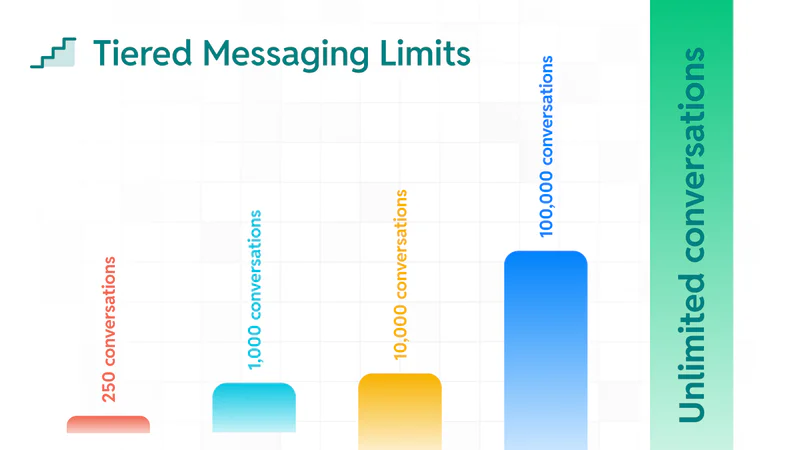
Typical tiers you will see in WhatsApp Manager
You will commonly encounter a progression like:
Starter tier: ~250 unique users / 24 hours
Growth tiers: commonly shown as 1,000 or 2,000, then 10,000, then 100,000
Unlimited: Requires consistently high quality and, in some cases, additional Meta approval signals
What improves your chances of moving up a tier
WhatsApp’s direction is consistent across implementations: you level up by sending wanted messages to opted-in users and keeping quality strong.
Prove demand: Many setups upgrade after you use a meaningful share of your current limit within a defined period (for example, some guidance cites hitting half the limit in a week to trigger an upgrade review).
Protect quality: Avoid blocks, spam reports, and low engagement patterns.
Keep opt-in clean: Consent-driven messaging helps avoid flags and improves long-term deliverability.
What is WhatsApp Cloud API throughput (messages per second)?
Throughput is your “speed limit.” Even if your tier allows you to message thousands of users, you can still fail sends if you push too many messages per second. Cloud API throughput is commonly 80 messages per second (MPS) by default for a business phone number and can be upgraded (often up to 1,000 MPS) when eligible.
Default throughput and automatic upgrades
A practical dev implication: design for bursts (campaign drops, OTP spikes, shipment events) using queues and controlled concurrency. If your throughput is still at the default level, blasting without throttling often leads to 130429 errors and delayed delivery.
What is the pair rate limit and why do you hit it?
Pair rate limiting kicks in when you send too many messages too quickly from your business number to the same recipient number. The platform returns a “pair rate limit hit” error and expects you to slow down, retry later, and avoid hammering a single user with rapid-fire sends.
Common product scenarios that trigger pair limits
OTP resend loops (multiple retries per user in seconds)
Status updates that fire too frequently (logistics, trading, ride-hailing)
Chatbot flows that send multiple proactive messages without waiting for user interaction
Duplicate event processing (same webhook/event triggers multiple notifications)
How to stay within WhatsApp rate limits without hurting UX
You can stay compliant and still ship fast by designing messaging like a production system: queued, observable, and feedback-driven. Combine channel strategy (who gets what), throttling (how fast), and engagement hygiene (who actually wants it).
Queueing, throttling, and backoff
Central queue: Buffer bursts instead of firing sends directly from request threads.
Token bucket throttling: Enforce MPS limits globally and per number.
Per-recipient pacing: Implement conservative pacing to reduce pair-limit hits.
Exponential backoff on 130429/131056: Retry later, not immediately.
Segmenting and reducing low-engagement marketing sends
Stop sending to users who ignore or block messages.
Prioritize high-intent segments first.
A/B test templates for engagement, then scale winners.
This directly reduces 131049 exposure because WhatsApp is more likely to fail marketing messages that are less likely to be read.
Using live customer service windows correctly
Live conversations are typically more forgiving than cold-start marketing outreach. Design your flows so that:
You use templates appropriately to open a conversation when required, and
Once users engage, you handle follow-ups inside the service window instead of repeatedly trying to restart marketing conversations.
Fyno to the rescue!
Fyno reduces rate-limit failures by adding an orchestration layer: it queues messages, throttles to your current Meta limits, applies retries with logic, and helps you route around failures using fallback channels. This means fewer dropped notifications, fewer fire drills, and a cleaner developer experience.
Built-in throttling, queuing, and retries
Auto-throttling: Prevents 130429 by pacing sends to your throughput.
Per-user pacing: Reduces pair-limit failures (131056) by controlling bursts per recipient.
Smarter retries: Backoff policies that retry when it actually makes sense, not in a tight loop.
Opt-outs, compliance safeguards, and analytics
Preference-aware sending: Helps reduce blocks and spam flags.
Delivery observability: Identify patterns (which templates, segments, and times cause failures) and adjust proactively.
Failover to SMS, email, push, and more
When WhatsApp fails (rate limit, user unreachable, policy restrictions), you often still need the message delivered. Fyno can route critical notifications to fallback channels so “message failed” does not become “business failed.”
Conclusion
By understanding Meta's WhatsApp rate limits and leveraging Fyno's platform, you can streamline your development process and ensure reliable message delivery for your users.
Bonus Tip:
Regularly monitor your messaging limits and quality rating within the WhatsApp Business Platform.
Fyno makes WhatsApp notification integration a breeze. Sign up today and experience the difference!